
Cloud vs On-Premise: The Honest Comparison
On-Premise | Cloud | |
|---|---|---|
Cost structure | Capital expense up front, depreciating | Operating expense, pay per use |
Capacity | Fixed: sized for your busiest weekend | Elastic: scales to the fixture list |
Remote collaboration | Hard: VPNs, proxies, shipped drives | Native: same access from anywhere |
Speed to publish | Limited by local render and upload | Limited mostly by the workflow itself |
Maintenance | Your team patches and upgrades | Provider handles infrastructure |
Disaster recovery | A second site you must build | Built into the platform |
Latency to live feed | Lowest possible at the venue | Seconds, acceptable for clips and recaps |
Control over hardware | Total | Abstracted away |
Neither column is universally better. The question is which parts of your operation sit in which column. Most organizations that have made the move report the same pattern: they did not do a wholesale migration. They moved the content factory first and left the transmission chain alone.
The pattern across the industry: live transmission and venue operations often stay on dedicated infrastructure, while everything downstream of the feed (clipping, editing, packaging, distribution and archive) moves to the cloud first because that is where elasticity pays off most.
The Cloud Production Workflow, Step by Step
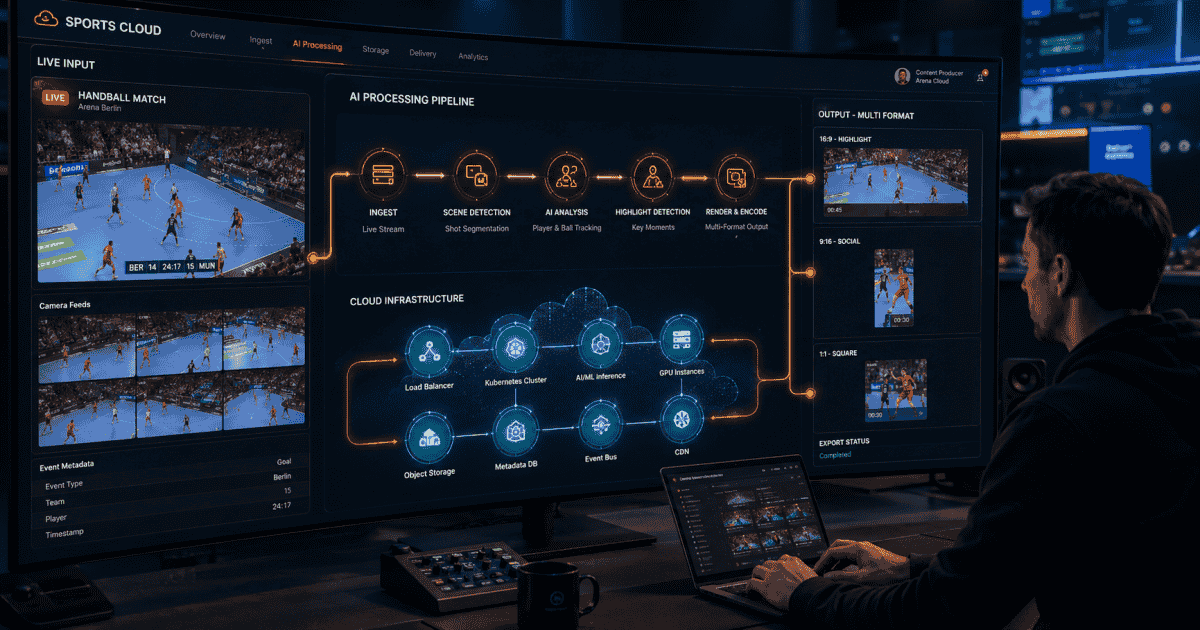
Here is what a cloud-native sports video pipeline looks like once the infrastructure question is settled. Each stage runs in the cloud, and the entire sequence can happen in parallel across as many fixtures as the schedule demands.
1. Ingest. The live feed streams into cloud storage as it happens (RTMP, SRT or file-based for recorded events). No truck, no LTO tapes, no overnight upload. Multiple feeds from multiple venues arrive in parallel, and the system treats twenty concurrent ingests the same way it treats one. This is where cloud elasticity pays its first dividend: ingestion capacity is not constrained by how many capture cards you own.
2. Detection. AI watches the feed as it arrives, flagging goals, saves, momentum swings and other key moments using visual, audio and scoreboard signals. This runs identically whether one match is live or twenty, which is precisely what fixed hardware cannot do. The models analyze multiple signal layers simultaneously: crowd noise spikes, scoreboard changes, player positioning and referee gestures all contribute to moment classification. (How this works in detail: AI sports video highlights.)
3. Clip and package. Detected moments are cut with proper lead-in and celebration time, tagged with players, teams and event type then rendered to templates: graphics, scorebugs and branding applied automatically. Each clip inherits the metadata from detection, so downstream systems know exactly what they are distributing without manual tagging.
4. Reformat. Each clip renders for every destination from one master: 16:9 for YouTube and OTT, 1:1 for in-feed social posts and 9:16 for Stories, Reels and TikTok. The subject is tracked and kept in frame automatically, so vertical crops do not cut off the action (AI Reframe).
5. Review and publish. Editors review from a browser, anywhere. An editor in London and a social media manager in Singapore can approve the same clip seconds apart without shipping files or syncing local drives. Approved clips push to social platforms, OTT apps and CMS embeds directly. Recaps assemble and update automatically at halftime and full time (Smart Live Recap).
6. Archive. Everything lands in a searchable, tagged library the moment it is produced, instead of a folder structure someone promises to organize later (Archive Media Management). Every clip inherits its metadata from production: players, teams, event type, competition and timestamp are all attached automatically. Six months later, when the social team needs every goal from a specific player's season, the query takes seconds.
End to end, the workflow delivers publishable clips in under 30 seconds from the moment, which is the standard fans and platforms now expect. The entire sequence runs without manual intervention from feed to published clip, though editors can step in at any point to adjust cuts, swap templates or override selections.
What It Costs, Structurally
The first question every executive asks about cloud production is what it costs. The honest answer: it depends on what you compare. Total cost of ownership over three years almost always favors cloud for organizations running more than a handful of events per month, but the savings show up in different lines than people expect.
Cloud production replaces three big cost lines with one variable line:
Hardware refresh cycles disappear. No more three-year replacement of edit workstations, render nodes and storage arrays sized for peak load. The capital budget drops to zero for production infrastructure, replaced by a monthly usage charge that scales with activity.
Idle capacity disappears. On-prem gear sized for the busiest weekend of the season sits underused the rest of the year. Cloud capacity follows the fixture list: high on a cup final weekend, minimal during the off-season, zero during a break in the calendar.
Staffing scales differently. Because AI handles the repetitive 80 percent (detection, cutting, formatting and tagging), small teams cover schedules that used to need shifts of editors. A league that previously needed six editors working in shifts across a weekend of fixtures can cover the same schedule with two people reviewing AI-generated output. This is the dominant saving for most organizations, larger than the infrastructure line itself.
The variable to watch is egress and storage growth: a clear retention policy (what stays hot, what archives cold, what deletes) keeps the bill predictable. Organizations that let storage grow unchecked for two seasons discover the bill eventually, and it is always cheaper to set the policy before migration than after.
Latency: What to Expect
Latency is the concern that keeps broadcast engineers skeptical of cloud production, and it deserves a straight answer.
Cloud adds seconds, not minutes. For live transmission to air, venue infrastructure keeps its edge and that is fine: cloud production is not trying to replace the broadcast chain. For everything fans consume on phones (clips, recaps and vertical cuts), a pipeline that publishes within half a minute of the moment is faster than any manual workflow ever was, and the social conversation window is minutes long, not seconds.
The practical benchmark to hold your stack to: a goal should be on your platforms before the replays stop airing. If your clip hits social while the commentators are still discussing the play, you own the conversation. If it arrives five minutes later, you are competing with fan-shot phone clips and rival accounts that moved faster.
Rights, Security and Compliance
Sports footage is licensed property, and rights holders are correctly cautious. Moving footage to the cloud raises immediate questions about who can access it, where it is stored and how leaks are prevented. A production-grade cloud setup covers:
Encryption in transit and at rest, as standard.
Access control: per-user permissions and audit logs for who touched which asset, which is tighter than most on-prem facilities ever enforced.
Watermarking options for pre-release and review copies.
Data residency: content stored in agreed regions, which matters for European rights deals under GDPR.
The key shift is from implicit trust (anyone with physical access to the edit suite) to explicit trust (named users with logged actions). For most organizations, a managed cloud platform raises the security bar relative to aging local infrastructure rather than lowering it. The audit trail alone is a step change: when a rights holder asks who accessed a specific asset and when, the answer takes seconds to produce instead of a shrug and a phone call.
When On-Premise Still Wins
Honesty matters here, and any vendor that tells you cloud is the answer to everything is selling you something without understanding your operation. There are genuine cases where local infrastructure is the right choice:
Venue-side live transmission with single-frame latency budgets stays on dedicated hardware.
Locations with poor connectivity cannot feed a cloud pipeline reliably. Remote venues, outdoor stadiums in areas with limited broadband or international tournaments in regions with unreliable internet may need edge capture with store-and-forward.
Contractual restrictions in some rights agreements still mandate specific infrastructure or prohibit cloud storage of certain content categories. Review every active rights contract before migrating licensed footage, and get explicit sign-off from the rights holder where the language is ambiguous.
The pragmatic architecture for most sports organizations is hybrid: keep the transmission chain where it is, move the content factory to the cloud. Acknowledging these limits up front builds internal credibility and prevents the kind of failed migration that gives cloud a bad name in broadcast engineering circles.
Migrating Without a Big Bang
The organizations that migrate successfully share one trait: they start small, measure everything and expand only when the numbers justify it. Here is the pattern that works.
1. Start with one competition's clipping workflow. Ingest the feed in parallel with your existing process and let the cloud pipeline produce social clips alongside business as usual. Running both systems side by side removes risk and gives your team time to learn the new workflow without deadline pressure.
2. Compare ruthlessly. Time-to-publish, clips per match, editor hours per fixture. The pilot should win on all three within a month. If it does not, the problem is almost always workflow configuration rather than platform capability, and it is worth diagnosing before expanding scope.
3. Move the archive second. Indexing historical footage unlocks evergreen content and makes the library searchable for the first time. Most organizations discover that their back catalogue is far more valuable than they assumed once it can actually be found and clipped on demand.
4. Retire local kit on its natural refresh date. No need to write off working hardware; just stop replacing it. When the next storage array or edit workstation reaches end of life, the cloud pipeline has already proven it can carry the load.
The most common mistake in migration is treating it as a technology project. The bigger challenge is workflow design: deciding who reviews clips, what approval gates exist, which metadata standards to enforce and how distribution rules map to the new pipeline. Get those decisions right during the pilot and the technology follows. See how mid-tier leagues use AI highlights.
Zentag AI is a cloud-native sports video platform covering this full workflow: ingest, AI detection, automated clipping, reframing, recaps, distribution and searchable archive in one place. It serves small leagues that never had a production facility and broadcasters reducing dependence on one, with the same pipeline.