
First, What an API Actually Is
The term API gets used constantly in vendor conversations and rarely gets defined. If your team lives inside one every day, skip this section. If your day is closer to rights deals, editorial planning or fan engagement than to engineering, it's worth two paragraphs.
An API is a defined connection between two software systems that lets them exchange work directly, without a person moving files or clicking through screens in either one. When a vendor says their product has an API, they mean the product can be operated by another system, not only by a human using its interface. The same actions a person would take in the interface, ingesting a feed, generating a clip, publishing to social, become instructions your existing systems can send and receive automatically.
The practical consequence for a buyer is this: Zentag AI's automation doesn't have to arrive as another tool on your operators' desktops. It can arrive as a capability inside the tools they're already using. The clips still get produced, the metadata still gets attached, the highlights still get published; the difference is that none of it requires anyone to open Zentag AI itself. That's the shift the rest of this article is about.
What the Partner API Actually Supports
The API surfaces the same automation that runs inside Zentag AI's own product, but exposed as building blocks your engineers can wire into your stack. In broad terms:
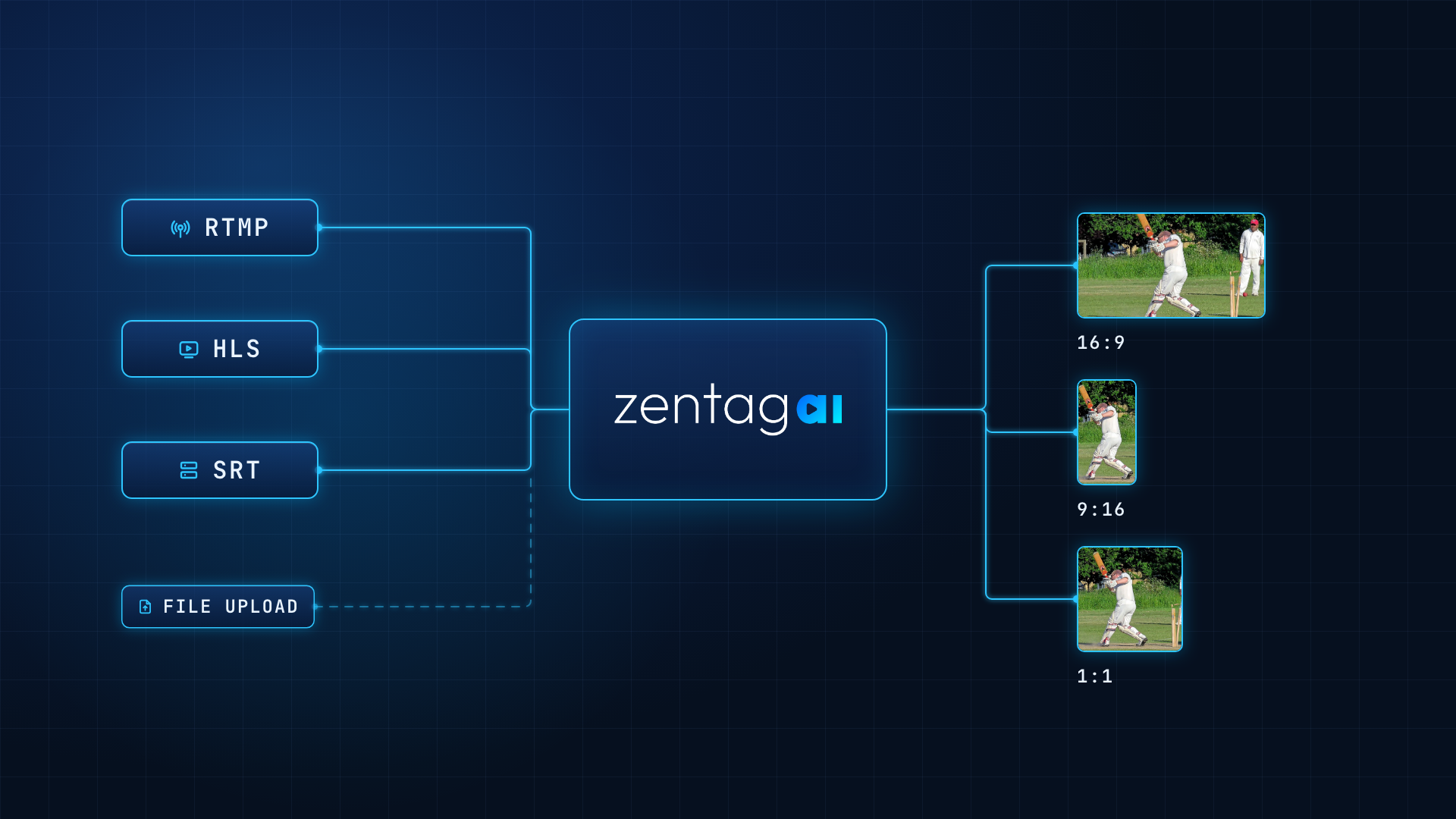
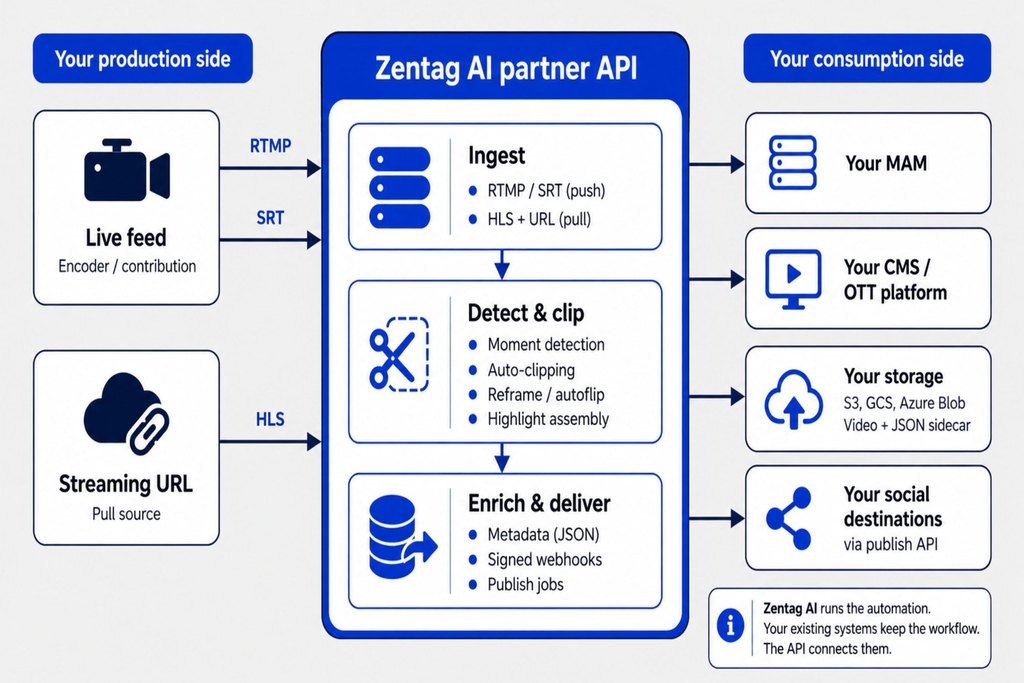
Ingest. Register a live stream, or hand Zentag AI a feed to ingest and analyse. Both push (you send us the feed) and pull (we fetch it from a source URL) input types are supported. On the push side, that includes RTMP and SRT. On the pull side, standard playback and streaming URLs including HLS. Whichever the broadcast side of your operation already produces, the API can accept.
Clip and reframe as jobs. Turning a moment into a clip, autoflipping it to a new aspect ratio with subject tracking, or cropping to a fixed window are all asynchronous jobs: you fire them, get a job id back, and receive the finished result via webhook when it's done. Original clips are never modified; new variants are added alongside them, so an autoflip and a crop of the same clip live side by side rather than overwriting each other.
Highlight assembly. Generate a highlight reel manually (a specific list of clips), by AI for a single stream, or by AI across your entire library, all as async jobs with the same webhook completion pattern.
Enriched metadata. Every clip exports as a JSON document containing the clip plus its enrichment: competition, players, sport, AI event type. The same payload is written as a sidecar file when clips are pushed to your external storage. This is the layer that makes clips useful downstream, and it's exposed as a first-class field, not an afterthought.
Publish to social. Push a clip directly to a connected social destination through the API, with the outcome delivered as a publish.succeeded or publish.failed event. Reconciliation is built in: you can list every publish attempt including failures, filter by platform, and see exactly what went out.
External storage. Push completed clips (video, thumbnail, JSON sidecar) into your own configured storage buckets in a single call, or bulk-push many clips at once. The video and the metadata land together, so whatever indexes your storage sees the enrichment automatically.
Media library and filters. The same filter system that powers Zentag AI's own library UI is available on the API: filter clips, highlights and streams by player, competition, match, rating or event type, get counts for a filter selection, and paginate through results with stable cursors. If your team wants to build a custom library UI or a filtered feed inside your own product, the primitives are there.
Webhooks. Async work is delivered by signed webhooks (clip.ready, highlight.ready, publish.succeeded, stream.started and more) with HMAC signature verification, retries with exponential backoff, and a replay mechanism for missed deliveries. Polling endpoints exist for reconciliation but the pattern is event-driven by design.
The full developer documentation covers every endpoint, authentication, rate limits and versioning policy. If your engineering team wants to look before they book a call, that's the fastest way to get real answers.
Two Concrete Ways Customers Wire This Into Their Existing Stack
The abstract case for an API is that it's flexible. The concrete case is easier to picture.
A broadcaster with an existing MAM. The broadcaster already has a media asset management system their operators know, and years of process built around it. The API lets Zentag AI do the detection and clipping in the background: live feeds go into Zentag AI via RTMP or SRT, moments are detected and clipped automatically, the finished clips (plus the JSON metadata sidecar with players, competition, event type and significance) get pushed into the broadcaster's own storage bucket. From the operator's perspective, new tagged, sport-ready clips just appear in the MAM they were already using. Nothing about their workflow changed; the volume and coverage of clips they have to work with did.
A league or federation running its own OTT and social operation. The league already has an OTT platform and a social publishing tool. Zentag AI ingests the live feed, generates clips and highlights automatically, and the API delivers them into the league's own systems in real time: clips into the OTT CMS with full metadata attached, highlight reels ready for OTT and social, and (where useful) direct publishing to connected social accounts triggered through the API. The league's editorial team keeps the tools they know; the coverage extends to every match on the schedule instead of just the fixtures they had capacity to cover manually.
Both are the same pattern: Zentag Ai's automation runs where the content is produced, the customer's stack runs where the content is used, and the API is the layer that keeps them in sync.
Why This Matters for AI Adoption
A pattern shows up whenever an AI product is being evaluated by a team that already has a working stack. The demo is impressive. The pilot goes well. The rollout stalls, because deploying the tool for real means asking every operator to change how they work, and the appetite for that is usually less than the appetite for the AI itself.
An API changes the shape of that decision. The AI doesn't have to become another tool on the operator's desktop. It becomes a service the operator's existing tools call, invisibly, in the background. That distinction is what turns a promising trial into a production rollout, because it removes the change-management cost that usually kills adoption after month two.
For broadcasters, leagues and OTT platforms already looking at how AI can extend their sports video coverage without expanding their editorial teams, the question worth asking of any vendor isn't just what the AI can do. It's how the AI gets into the systems the team is already using. The Zentag Partner API is the answer for that question on our side.